
Even though people were buying products every day, the Meta match rate in their primary markets was sitting at effectively zero – just 0.3% overall. The results on the surface looked acceptable, but the algorithm was effectively working in total darkness

Here’s what that means: Meta’s catalog match rate is the share of pixel events (ViewContent, AddToCart, Purchase) that Meta can tie back to a specific product in your catalog feed using the content_id sent with each event. When that number is near zero, Meta isn’t failing to see your visitors’ activity. It’s seeing the activity but has no idea which product it relates to.
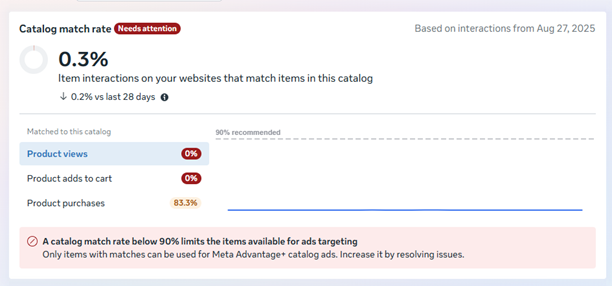
Only 0.3% of product interactions matched the catalog, with product views and adds to cart both at 0%.

The cost of running blind

A low match rate is a deceptive enemy because it does not stop your ads from running, but it does place a hard ceiling on how much your marketing can actually grow. Even though this regional giant was moving thousands of products daily, Meta’s machine learning was unable to link purchase events back to the actual items in the inventory. This meant that the algorithm was effectively guessing which users to target next instead of learning from real behavior. While the results were “okay” on paper, the brand was leaving an incredible amount of efficiency on the table simply because the machine did not have the sight it needed to optimize the spend.

What usually causes this

In our experience, a low catalog match rate almost always comes down to one (or more) of these:

The technical language barrier

When we performed our deep diagnostic across their measurement stack, we found a classic case of two sophisticated systems trying to communicate in a dark room using different languages. The Content IDs being fired by the website’s pixel did not match the specific formatting required by the product catalogue, which meant the data was being sent but never recorded. These turned out to be two separate issues, showing up in two different markets, but both had the same effect: Meta couldn’t trust the data it was getting, so it threw it away instead of using it.

Furthermore, a subtle currency misalignment meant the pixel was reporting a sale in one currency while the catalogue was set up in another. Rather than trying to reconcile the difference, Meta flagged those events as inconsistent and dropped them. The ads were reaching people, but the data was vanishing into a void before it could ever help the algorithm improve.
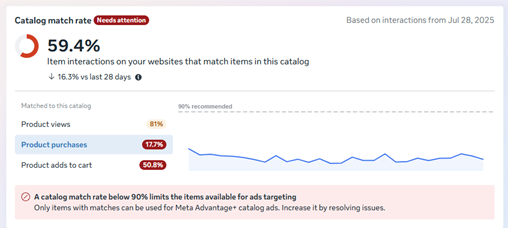
Market A, before the fix: 59.4% overall catalog match rate, with only 17.7% of purchases matched to catalog items.

Rewiring the event pipeline

We move beyond simple troubleshooting to completely re-engineer the event pipeline for every market. We did not just patch the holes in this instance; we ensured the plumbing was built for long-term scale by aligning every data point between the webshop and the Meta Catalogue.

1 Synchronizing Content IDs (Market A)

We found that the IDs in the pixel were often missing prefixes or suffixes that the catalogue required for a match. We reformatted the core event structure in Google Tag Manager so that every viewContent, addToCart, and purchase event carried a unique and recognisable twin to the item in the master inventory. Meta’s own Advantage+ catalog ads documentation requires content_ids sent via the pixel to match the IDs in the catalog exactly so this was as much about following their spec as it was about fixing our own setup.
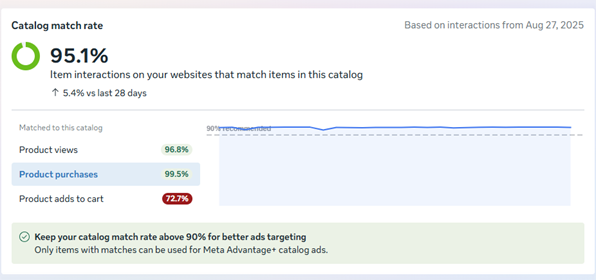
After aligning Content IDs, catalog matching reached 95.1% overall, with 99.5% of purchases linked to catalog items.

2 Global Currency Alignment (Market B)

The second market had a simpler problem: the numbers didn’t line up. The website’s tracking code was sending prices in one currency, while the product catalog was set up in another. To Meta, that looked like an inconsistency it couldn’t trust. So it quietly dropped those purchase events instead of counting them. Once we made sure both sides spoke the same currency, that barrier disappeared, and the sales started showing up where they should.
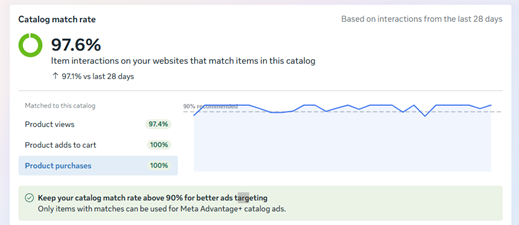
After correcting the market-specific currency settings, the catalog match rate reached 97.6%, with purchases and adds to cart both matched at 100%.

3 Real-Time Verification

We used a combination of GTM Preview mode and Meta’s Event Testing tools to validate every fix as it went live. We watched the red error flags clear in real time as the system finally recognised the product data it had been ignoring for months.

Restoring catalog matching

The post-fix screenshots show catalog match rates of 95.1% and 97.6%. In the 97.6% snapshot, purchases and adds to cart both matched at 100%, while product views reached 97.4%.

Meta could now connect far more website interactions to the corresponding catalog products and use those matched items in catalog ads. We checked the event parameters alongside the matching results, because a tag can fire successfully while still sending IDs the catalog cannot recognize. For a webshop operating across markets, that validation needs to cover the product ID structure and currency settings in each setup.

If you’re seeing similar gaps in your tracking, see how we approach Martech audits and integrations.
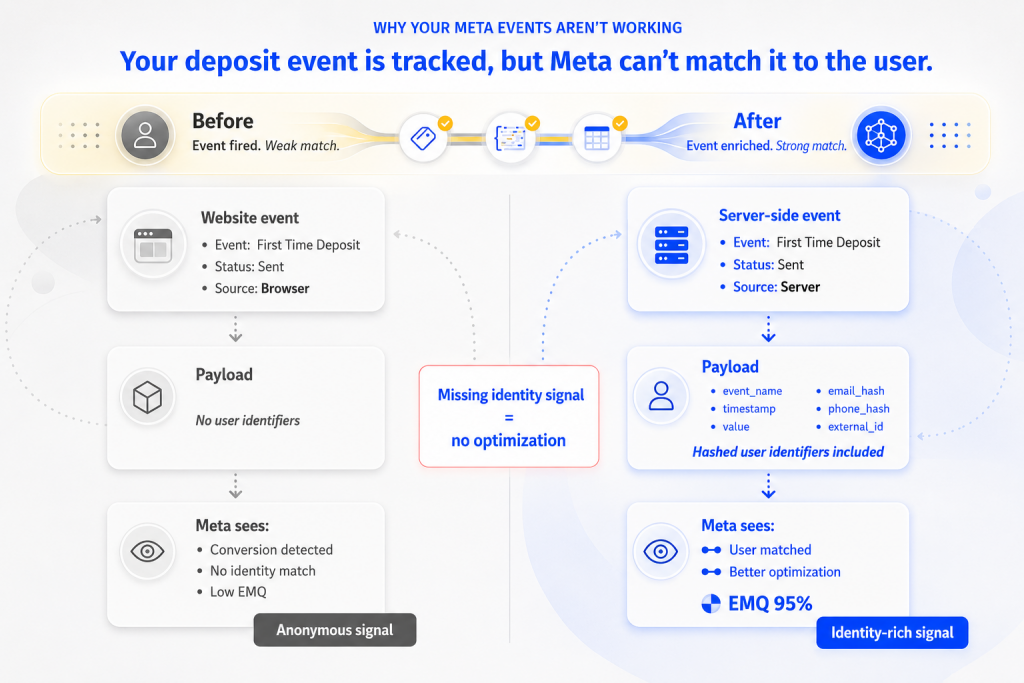
Yet, we frequently see a massive disconnect where the money is hitting the bank, but the Meta algorithm is left standing in the dark. Even when your GA4 reports show a healthy flow of “First Time Deposits,” Meta often sees them as anonymous events with no identity attached.

The blind spot of the high-value event

Most management teams focus on conversion volume, but the real power lies in the quality of the match. When a user makes their first deposit, Meta attempts to link that action to a specific profile in its database. This is the Event Match Quality (EMQ) score.

If you are only sending a basic signal that a “Deposit” happened, you are essentially giving Meta a puzzle with half the pieces missing. The algorithm knows a transaction occurred, but it cannot tell who performed it. Without that identity “handshake,” Meta cannot optimize your ads for similar high-value users. You end up with a machine that is running on half-power, unable to build accurate lookalikes or retarget users with the precision that a regional leader requires.

The problem: Data without identity

We recently solved this exact bottleneck for a client where the “First Time Deposit” and “Deposit” events were firing, but the match quality was dangerously low. The system was technically working, yet the algorithm was guessing. It was a silent performance killer. Because the data was anonymous, Meta’s attribution was honest but incomplete. The machine saw the success but couldn’t learn from it, which meant the cost per acquisition remained stagnant even after the tracking was “fixed.”

In a post-cookie landscape, relying on the browser to tell Meta who the user is will always lead to failure. Privacy filters and ad blockers strip away the identifiers that the algorithm needs to see. To win, you have to stop sending empty events and start sending rich signals.

Our solution: Deep data infusion

We re-engineered the way these critical events are delivered. We didn’t just fire the event; we packed it with the identity data Meta craves.

We moved the logic to the server, where we could securely hash and bundle user information, like emails and phone numbers, directly into the “First Time Deposit” and “Deposit” signals. By filling these events with high-quality, encrypted identifiers, we transformed an anonymous click into a 95% match.

Same event, different signal quality

This deep infusion of data allows the “handshake” to happen every single time, regardless of what the user’s browser is trying to block. We made sure that every dollar deposited on the website was a lesson learned by the Meta algorithm.

Precision scaling and honest ROI

The results of fixing the EMQ on these specific custom events are immediate. When the algorithm finally knows exactly who is making the first deposit, it stops wasting your budget on broad reaches and starts finding the specific patterns that lead to profit.

The “black hole” in your attribution disappears. You finally see the true impact of your creative strategy because Meta can accurately claim the credit for the users it actually influenced. Most importantly, your ability to scale increases because your lookalike audiences are now built on solid ground, not anonymous ghosts.

If your highest-value events are firing but Meta still cannot match them to real users, your tracking is only half fixed. The next step is sending stronger signals the algorithm can learn from.

You submit a ticket. The engineering team is swamped patching critical bugs, and marketing data is inevitably pushed to the bottom of their priority list.

This exact scenario happened recently with one of our biggest clients, a major sports betting and casino operator in the Balkans. A massive platform update completely broke their custom GA4 ecommerce tracking. They were flying blind during a peak traffic period, and the development team was simply unavailable to investigate or provide documentation on the new event structures.

We could not just sit and wait for weeks. We needed a creative martech solution to intercept the missing data and restore visibility immediately. Here is exactly how we built a custom data pipeline to solve the problem and save the day.

Blindness in a high-stakes environment

In the betting industry, granular user data is everything. You need to track every slip, every registration, and every deposit with absolute precision to optimise your campaigns.

Following their massive website update, our client experienced a severe data loss. The developers had unintentionally altered the naming conventions and parameters of crucial data layer events meant specifically for custom tracking.

The primary hurdles we faced:

We needed a way to see exactly what the website was doing under the hood, without requiring a single minute of developer time.

Catching data in the wild

Since we could not rely on the standard GA4 integration to catch unknown variables, we decided to build our own temporary serverless infrastructure. The goal was to cast a wide net, capture every single event firing in the background, and analyse the raw output.

Here is the technical blueprint of our workaround:

1. The custom GTM listener

We wrote a custom JavaScript function and deployed it through Google Tag Manager. Instead of sending data to Analytics, this script was designed to listen for any data layer push happening on the page or in the app. It specifically targeted the altered events that were slipping past our standard tags.

2. The Google Apps Script bridge

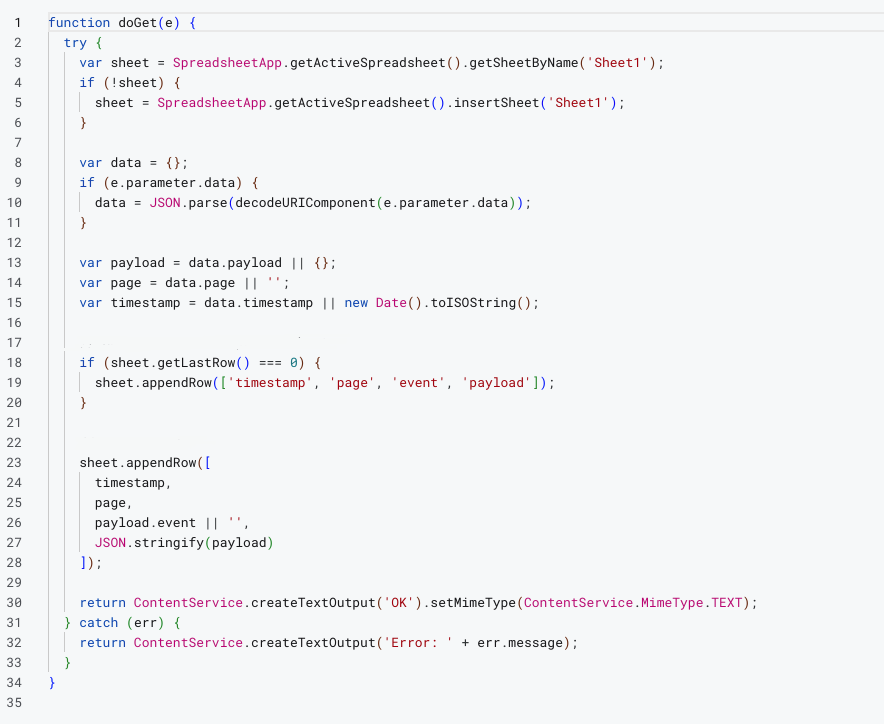
To process this data, we utilised Google Apps Script. We created an endpoint that could receive incoming payloads directly from our GTM listener, repackaging the code snippets on the fly.

Google Apps Script code


3. The Google Sheets database

Every intercepted event was pushed to a dedicated Google Sheets document in real time. We essentially turned a simple spreadsheet into a massive, searchable database for raw code executions.

Google Sheets database

The results: Fast debugging and immediate tracking restoration

We pushed the custom script live. Within a day, our Google Sheet was populated with an enormous volume of raw event data and code snippets.

By filtering and analysing this massive dataset, we quickly identified the root cause of the tracking failure. We discovered exactly how the developers had altered the event names and which custom parameters were missing or completely modified.

Armed with this precise information, we executed a two-part recovery plan:

Why proactive agencies win

Development teams will almost always prioritise product stability over marketing analytics.

As Growth consultants, our job is to engineer elegant solutions that keep the data flowing and not to complain about the developer bottleneck. By leveraging tools like GTM, Apps Script, and Google Sheets, we transformed a frustrating waiting game into a rapid, actionable resolution.

If your enterprise tracking keeps breaking during website deployments, you do not just need a standard analytics setup. As your growth partner, we know how to build robust safety nets and intercept critical data before it is lost forever.

Facing a similar tracking crisis right now? Don’t wait weeks for your development queue to clear. Fill out the form below, describe your broken events, and our Martech expert will build a custom interception script for your specific website architecture, completely free of charge. Let us get your data flowing again.
