



You submit a ticket. The engineering team is swamped patching critical bugs, and marketing data is inevitably pushed to the bottom of their priority list.
This exact scenario happened recently with one of our biggest clients, a major sports betting and casino operator in the Balkans. A massive platform update completely broke their custom GA4 ecommerce tracking. They were flying blind during a peak traffic period, and the development team was simply unavailable to investigate or provide documentation on the new event structures.
We could not just sit and wait for weeks. We needed a creative martech solution to intercept the missing data and restore visibility immediately. Here is exactly how we built a custom data pipeline to solve the problem and save the day.
Blindness in a high-stakes environment
In the betting industry, granular user data is everything. You need to track every slip, every registration, and every deposit with absolute precision to optimise your campaigns.
Following their massive website update, our client experienced a severe data loss. The developers had unintentionally altered the naming conventions and parameters of crucial data layer events meant specifically for custom tracking.
The primary hurdles we faced:
- No documentation
We had zero insight into what the new code snippets looked like or when they were actually triggering. - Developer bottleneck
The engineering team was occupied with core platform fixes. Digging into marketing tags was treated as a low-priority task. - GTM limitations
We could not map the new events in Google Tag Manager because we literally did not know the new variables, formats, or event names being pushed into the browser.
We needed a way to see exactly what the website was doing under the hood, without requiring a single minute of developer time.
Catching data in the wild
Since we could not rely on the standard GA4 integration to catch unknown variables, we decided to build our own temporary serverless infrastructure. The goal was to cast a wide net, capture every single event firing in the background, and analyse the raw output.
Here is the technical blueprint of our workaround:
1. The custom GTM listener
We wrote a custom JavaScript function and deployed it through Google Tag Manager. Instead of sending data to Analytics, this script was designed to listen for any data layer push happening on the page or in the app. It specifically targeted the altered events that were slipping past our standard tags.
2. The Google Apps Script bridge
To process this data, we utilised Google Apps Script. We created an endpoint that could receive incoming payloads directly from our GTM listener, repackaging the code snippets on the fly.
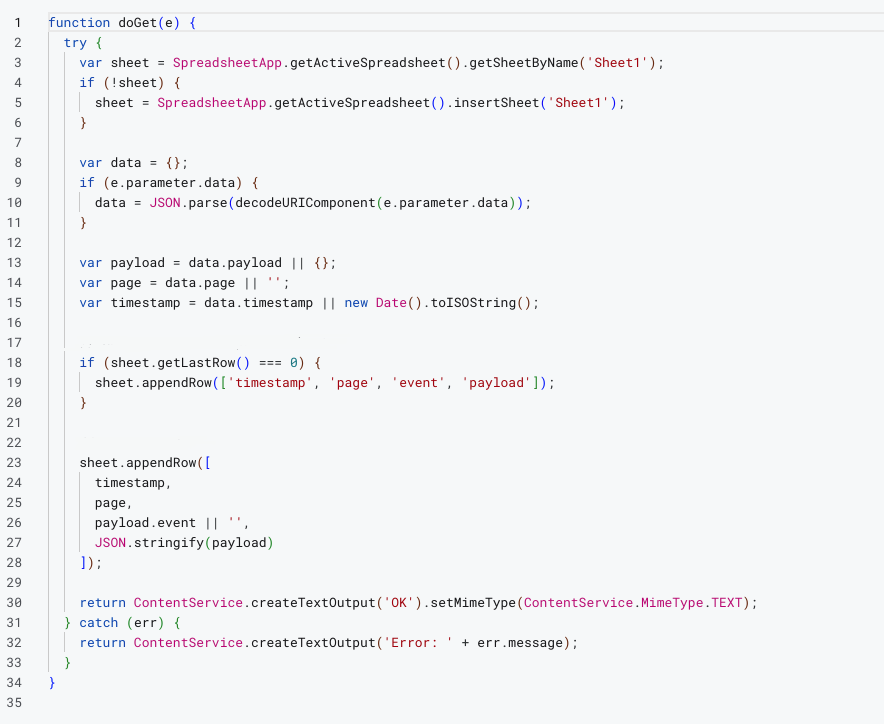
Google Apps Script code
3. The Google Sheets database
Every intercepted event was pushed to a dedicated Google Sheets document in real time. We essentially turned a simple spreadsheet into a massive, searchable database for raw code executions.

Google Sheets database
The results: Fast debugging and immediate tracking restoration
We pushed the custom script live. Within a day, our Google Sheet was populated with an enormous volume of raw event data and code snippets.
By filtering and analysing this massive dataset, we quickly identified the root cause of the tracking failure. We discovered exactly how the developers had altered the event names and which custom parameters were missing or completely modified.
Armed with this precise information, we executed a two-part recovery plan:
- Immediate fix
Using the raw data formats we discovered in our spreadsheet, we reconfigured the Google Tag Manager setup. We built temporary tags and triggers that accurately mapped the new, messy code snippets directly into GA4. Tracking was restored immediately, buying the client valuable time until the next official code update. - The developer brief
We handed the engineering team a silver platter report. Instead of just saying “tracking is broken,” we told them which files to review, what the old code was, what the new incorrect code was, and why it failed. This eliminated their debugging process.
Why Proactive Agencies Win
Development teams will almost always prioritise product stability over marketing analytics.
As Growth consultants, our job is to engineer elegant solutions that keep the data flowing and not to complain about the developer bottleneck. By leveraging tools like GTM, Apps Script, and Google Sheets, we transformed a frustrating waiting game into a rapid, actionable resolution.
If your enterprise tracking keeps breaking during website deployments, you do not just need a standard analytics setup. As your growth partner, we know how to build robust safety nets and intercept critical data before it is lost forever.
Facing a similar tracking crisis right now? Don’t wait weeks for your development queue to clear. Fill out the form below, describe your broken events, and our Martech expert will build a custom interception script for your specific website architecture, completely free of charge. Let us get your data flowing again.
